OAuth 2.1
OAuth 2.1 is the standard authorization framework adopted by the MCP specification to secure communication between MCP clients and servers. It allows clients to obtain limited access to server resources on behalf of a user, without sharing credentials directly. For a comprehensive introduction to how OAuth works in MCP, see the MCPJam OAuth Guide.
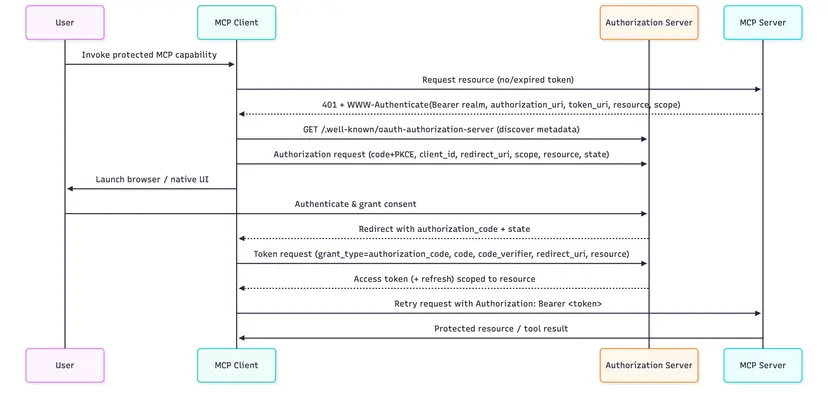
MCPConnect acts as an OAuth 2.1 resource server — it does not implement an authorization server. Authentication is delegated to an external provider (e.g. Microsoft Entra ID, Auth0, Keycloak, Okta, or any OpenID Connect provider).
INFO
MCPConnect currently supports only the Preregistration (Client Credential) mode, where the MCP client is pre-registered with the authorization server and uses its own credentials to obtain an access token.
The IOAuthConfig Plugin
OAuth is configured through the IOAuthConfig plugin:
uses
  MCPConnect.Configuration.Auth,
  MCPConnect.Security.Token;

AServer
  .Plugin.Configure<IOAuthConfig>
    .SetResource('https://mcp.example.com/mcp')
    .AddAuthorizationServer('https://auth.example.com')
    .AddTrustedIssuer('https://auth.example.com/')
    .SetTokenValidatorClass(TJoseTokenValidator)
    .AddScopesSupported('openid')
    .AddScopesSupported('email')
    .AddScopesSupported('profile')
  .ApplyConfig;
If no authorization server is configured, OAuth enforcement is fully disabled and every request is allowed through.
Configuration
The configuration values (resource URL, authorization server, token issuer) are typically read from environment variables or a .env file, as shown in the MCPServerOAuth demo:
AServer
  .Plugin.Configure<IOAuthConfig>
    .SetResource(TEnvironment.Get('OIDC_MCP_SERVER'))
    .AddAuthorizationServer(TEnvironment.Get('OIDC_AUTH_SERVER'))
    .AddTrustedIssuer(TEnvironment.Get('OIDC_TOKEN_ISSUER'))
    {$IFDEF DELPHI_JOSE_JWT}
    .SetTokenValidatorClass(TJoseTokenValidator)
    {$ELSE}
    .SetTokenValidatorClass(TClaimsTokenValidator)
    {$ENDIF}
    .AddScopesSupported('openid')
    .AddScopesSupported('email')
    .AddScopesSupported('profile')
  .ApplyConfig;
IOAuthConfig API Reference
| Method | Description |
|---|---|
SetResource(url) | The canonical, public URL of this MCP server. Must be called first — other methods derive URLs from it. |
SetRealm(realm) | The realm value sent in the WWW-Authenticate header. Defaults to 'mcp'. |
AddAuthorizationServer(url) | Registers an external authorization server. Can be called multiple times. |
AddTrustedIssuer(url) | Adds a trusted token issuer. Useful when the token's iss differs from the discovery URL (e.g. Entra ID v1.0 tokens). |
AddScopesSupported(scope) | Advertises a supported OAuth scope. Can be called multiple times. |
SetTokenValidatorClass(class) | Registers the class that validates bearer tokens. Without it, every bearer token is rejected. |
SetAudience(audience) | Value the token's aud claim must contain. Defaults to SetResource. |
AddRequiredScope(scope) | Scope the token must carry, else insufficient_scope. Can be called multiple times. |
SetClockSkew(seconds) | Tolerance on exp/nbf claims, in seconds. Defaults to 60. |
SetKeyCacheTTL(seconds) | Lifetime of the cached JWKS, in seconds. Defaults to 3600. |
EnableMetadataProxy(issuer) | Proxies the authorization server's discovery document, patching missing code_challenge_methods_supported. See the MCPConnect oauth documentation for details. |
Token Validators
MCPConnect ships three token validators:
| Validator | Unit | What it checks | Use case |
|---|---|---|---|
TJoseTokenValidator | MCPConnect.Security.Token.JOSE | Everything including the cryptographic signature, verified against the provider's published JWKS keys | Production |
TClaimsTokenValidator | MCPConnect.Security.Token | iss, aud, exp/nbf, required scopes, rejects "alg": "none", verifies kid exists in JWKS — but does not verify the signature | Testing with a real provider |
TDecodeOnlyTokenValidator | MCPConnect.Security.Token | Decodes the payload and verifies nothing | Local development only |
TJoseTokenValidator requires the JOSE-JWT library at compile time (controlled by the DELPHI_JOSE_JWT define in MCPConnect.inc) and the OpenSSL libraries at runtime.
Reading the Token in a Tool
Once a request is authenticated, the validated claims are available via [Context] injection as TMCPAccessToken:
TTestTool = class
private
  [Context]
  FToken: TMCPAccessToken;
public
  [McpTool('get-user', 'Get the current user information')]
  function GetUser: TUser;
end;

function TTestTool.GetUser: TUser;
begin
  Result := TUser.Create;
  Result.Name := FToken.Name;
  Result.EMail := FToken.EMail;
  Result.Subject := FToken.Subject;
end;
TMCPAccessToken exposes standard claims (Subject, Name, EMail, Scope, Issuer, Audience, Expiration, etc.) and the raw JWT payload via the Payload property for direct access to any non-wrapped claim. To test the scopes, use HasScope('orders:read') rather than searching the Scope string: it matches whole, case-sensitive scopes only.
The same object is filled by an API key validator, so a tool written this way works unchanged whichever authentication the server uses.
Authorizing Tools, Resources and Prompts
AddRequiredScope applies to the whole server: a token without that scope is rejected before any request is processed. To restrict individual tools, resources and prompts to the callers whose token carries the right scopes — and hide them from everyone else — see the Authorization chapter.
Further Reading
For detailed instructions on configuring and testing OAuth with external providers (including a step-by-step guide with Microsoft Entra ID, Cloudflare Tunnel, and MCPJam Inspector), see the OAuth documentation in the MCPConnect repository.